
I've got a confession, and it's a weird one coming from a Webflow Professional Expert: I left Webflow.
Not for a weekend fling with some shiny new builder. I rebuilt my whole portfolio from scratch in Astro, Sanity and Cloudflare. Mobile performance went from 54 to 98. Desktop sits at a clean 100/100/100/100 across Performance, Accessibility, Best Practices and SEO. And my monthly platform bill? Zero. Not "almost zero". Zero.
Don't get me wrong, this isn't a hate letter. I've been building commercial projects in Webflow since around 2020 (and poking at it even before that). That's 50+ projects, plus a lot of work around them: tech validation, project estimations, setting up team processes for working with Webflow CMS, and inventing custom solutions whenever the platform said "nope". Webflow is also the reason I can work with code at all. More on that at the end.
But after all these years, the relationship stopped making sense. So strap in: here's why I left, what I moved to, how AI changed the math, what I honestly miss, and who should probably stay right where they are.
The Breakup Letter: It's Not You, It's... Okay, It's a Bit You
There wasn't one big fight. It was a pile of small things that kept getting heavier: a performance ceiling I couldn't get past, a bill that kept growing, a CMS that said "no" a little too often, and a partner program that sent me more sales pitches than projects.
Any one of those, I'd have lived with. All of them together, while the alternative got easier every single month? That's when you start looking at apartments.
The Numbers: From 54 to 98 on Mobile
Let's start with the receipts, because I promised myself I'd show proof instead of vibes. Here are the PageSpeed reports, before and after.
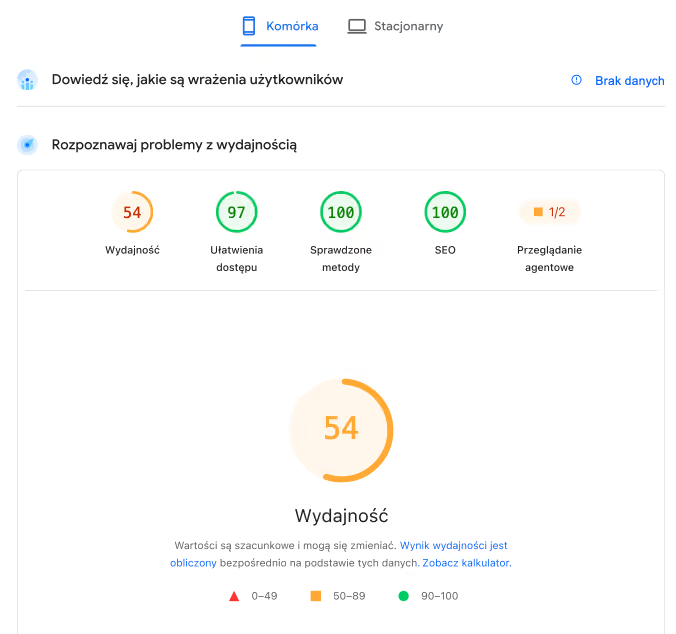
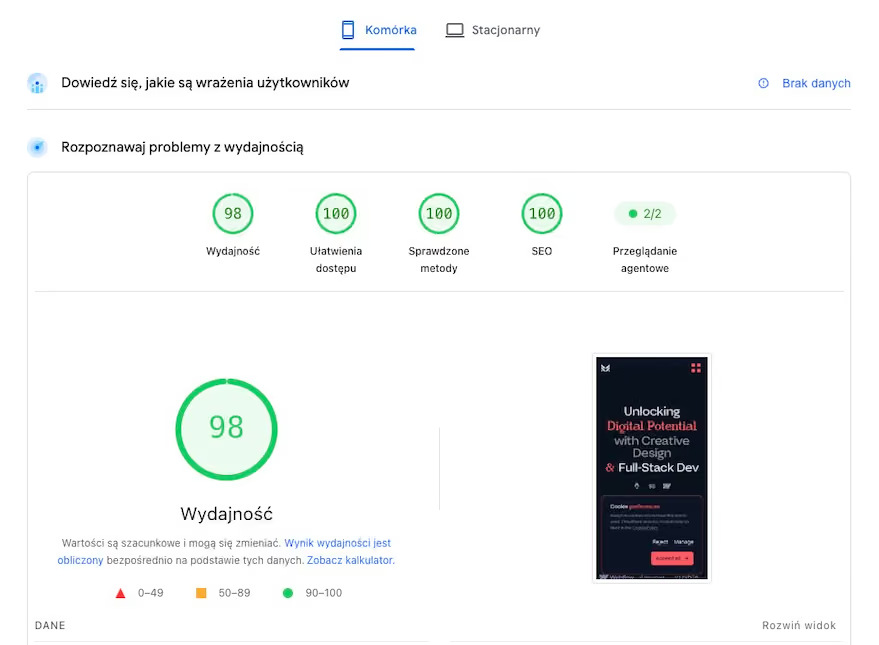
Here's the thing: you can optimize a Webflow site really well, and I did. But there's a floor you can't dig under. Every page ships Webflow's own runtime and interaction scripts whether that page needs them or not. You can lazy-load, compress and tweak all day, and you're still carrying the platform's baggage on every request.
When I looked at where the points actually came from, it boiled down to four things:
- Less JavaScript. Way less. Astro ships zero JS by default. No platform runtime, no interaction engine loading on a page that has no interactions. JS only shows up where I explicitly ask for it.
- Only the CSS that needs to be there. No global stylesheet that grows forever, no dead classes from that one experiment in 2022. Each component brings its own styles and nothing else.
- No code fighting the platform's defaults. On Webflow, a chunk of my CSS existed purely to undo Webflow's default styles. That's bytes you pay for twice: once to load the default, once to cancel it. Now there's nothing to cancel.
- Images served at the size they're displayed. Not "whatever fits the viewport", but the actual rendered size of that image in that layout. A thumbnail gets a thumbnail-sized file. Sounds obvious. Makes a huge difference on mobile.
None of this is magic. It's just what happens when nothing ships that you didn't ask for.
The Bill: Paying Twice for the Privilege
Now the part I hate writing, but can't skip.
On Webflow I was paying for two things at once: a Site plan with CMS for the portfolio, plus a Workspace plan. The Workspace plan wasn't optional for me. To stay in the partner program, you need an active Freelancer or Agency Workspace plan. So on top of hosting, I was basically paying a membership fee to stay eligible for leads.
Then 2026 happened. In May, Webflow merged the CMS and Business plans into a single Premium plan. For old CMS users that meant a price bump: $25/month billed yearly, or $39/month billed monthly. Sure, you get way more CMS items, but most portfolio sites never get anywhere near the old limits anyway. And sites inside Freelancer and Agency Workspaces move to the new prices at renewal from November 16, 2026.
With a small number of clients, that math just doesn't work. You're paying agency-level overhead for a freelancer-level pipeline.
The Leads Problem: Speed-Dating With Ten Other Agencies
"But the partner directory brings you clients!" Yeah, about that.
In one recent week I got more than five messages through it. Not project requests. Offers: people selling me SEO, lead gen, dev outsourcing, you name it. Zero people asking me to build something.
And the real leads? Across all that time, I got maybe one actual project out of it. My strong impression is that the genuine requests get blasted to multiple agencies at once. So you drop everything and reply within three minutes, because speed matters... and roughly 90% of my replies never got a follow-up. Not a "no thanks". Nothing.
So I was paying to stay visible to people who either wanted to sell me stuff or were shopping ten agencies in parallel. No thanks.
The New Stack: Astro + Sanity + Cloudflare
Here's what I moved to, and why each piece earned its spot.
Astro: Components, Not CSS Bloat
Astro lets me work in components, the same mental model as Webflow components, just in code. Each component carries its own markup, styles and (only if needed) scripts. Build a card once, use it everywhere, change it in one place.
Fun fact: Cloudflare acquired the Astro team in January 2026, and Astro stays open source under the MIT license. So the framework and the hosting now live under the same roof, but nothing forces you to host on Cloudflare. That matters, and I'll come back to it in the lock-in part.
Sanity: The CMS Schema I Actually Wanted
This is where I felt the ceiling disappear. In Webflow, the CMS decides what's possible. In Sanity, I decide. The schema is code, so if I can describe it, I can have it.
- Validation rules. Required fields, character limits, custom rules. Content can't break the layout because the schema simply won't let it.
- Multi-reference fields done right. Link any collection to any other collection, however I want. No "you've hit the max reference fields" moment.
- Images that handle themselves. Upload once and Sanity's image pipeline converts, resizes and serves optimized versions. No more exporting five sizes by hand.
- Add whatever I need. New field type? New content type? A few lines of schema, not a feature request on a wishlist board.
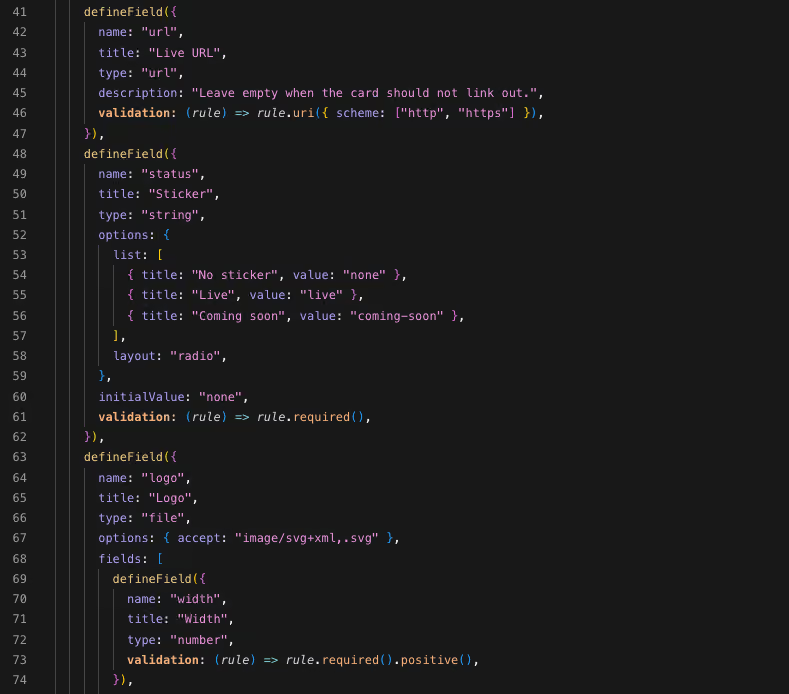
Some examples of things that were somewhere between painful and impossible in Webflow:
- Components inside rich text. I can let editors drop custom components straight into the rich text editor: callouts, embeds, code blocks, whatever the collection needs.
- Real tables. Draw the grid however you want, right in the editor. No more embedding HTML tables in a code block and praying.
- Page building from modules. I can create whole section modules and compose entire pages out of them in Sanity, without hardcoding a single page. Hero, features, testimonials, CTA: pick, reorder, publish.
- Card lists from multiple collections. One list that pulls from several different collections at once? No problem. In Webflow, that's a workaround festival.
- Front-end filtering without extra libraries. Filtering and sorting on the front end, done in my own code. No need for Finsweet Attributes to bridge the gap. (Love you, Finsweet. You carried a whole generation of Webflow sites.)
And the free plan is generous for a site like this: 20 users and 10,000 documents, with image and file assets not counted toward that limit.
Cloudflare: Hosting That Costs Nothing
My site runs on Cloudflare Workers. Global network, fast everywhere, and I'm not watching bandwidth tiers like a utility bill.
Staging lives separately, set to noindex, so search engines never see it. For my own site that's enough.
For client projects, I can go a step further: a staging subdomain under the client's own domain, locked with Cloudflare Access. The client enters an email from their company domain, gets a one-time PIN in their inbox, and they're in. Nobody else is. No shared passwords flying around Slack, no "what was the staging password again?" emails.
Forms: Resend + Turnstile + a Honeypot
I don't need a CRM for a portfolio. I need a contact form that lands in my inbox and doesn't drown me in bot junk.
- Resend sends the emails. Its free plan covers 3,000 emails a month (100 a day), which is way more than a contact form will ever need.
- Cloudflare Turnstile keeps bots out without making real humans click traffic lights. It's free for up to 20 widgets.
- A honeypot field catches the dumb bots before they even get to Turnstile.
Bull's-eye. So far: zero spam. Not "less spam". Zero.

GSAP + View Transitions: Animations Without the Performance Tax
Page transitions and GSAP animations are all still there, and the scores are still at the top. For transitions I use Astro's View Transitions. The nice part is how flexible they are: you tune them per project. Should a transition play only once? Should Astro's client-side router take over navigation completely? Your call, project by project.
And here's a funny one: Webflow is the reason GSAP is completely free now, including all the former Club plugins like SplitText and MorphSVG, even for commercial use. So I'm leaving Webflow and taking one of its best gifts with me. Thanks for that one too!
Working With AI: The Unfair Advantage
This is the big shift nobody talks about honestly. A visual canvas is hard for AI to work with. Code isn't.
With the whole site in a repo, AI works on real files: components, schemas, queries, config. Describe what you want, review the diff, ship it. My daily setup is Cursor and Claude. I usually do the planning and the Sanity schema design with Opus, because that's where thinking matters most. Then Grok or Cursor's Composer writes the actual code against that plan.
And here's the part that still makes me laugh: about 70% of this site I built with GrokBot and Cursor's cloud agents from my phone, without opening my computer. Coffee in one hand, phone in the other, reviewing and steering. Then I sat down and finished the rest in Cursor.
Custom development used to be expensive and slow, which is exactly why so many of us picked a no-code tool in the first place. In the AI era, it's far more accessible. If you understand how the web works, you can now build things that used to require a dev team. That changes the math for every designer who said "I'm not a developer".
Going Multilingual: No Add-On Required
If I ever decide I want the site in more languages, it's not a problem with this stack. It's a routing and content-model decision, not a paid add-on. Astro has i18n routing built in, and Sanity lets me model translations however I want: translated fields, separate documents per language, whatever fits the content.
No Vendor Lock-in: My Code, My Rules
If you've ever tried leaving Webflow, you know the export isn't a real exit. Code export doesn't include your CMS content, and forms and site search don't work on exported sites. You get a snapshot, not your site.
Now everything is mine. The code lives in Git, the content lives in Sanity behind an API, and the hosting is swappable. If Cloudflare annoyed me tomorrow, I could deploy somewhere else without rebuilding anything.
And I'm clearly not the only one thinking this way. More and more designers and agencies are making the same move, and "Webflow to Astro" migration guides are popping up everywhere. When custom dev is this accessible, the trade-offs of a closed platform get a lot harder to justify.
The Honest Part: What I Miss (and Who Should Stay)
I won't lie to you, it's not all sunshine. The one thing I'll genuinely miss is automatic updates. On Webflow, the platform keeps itself up to date, and you never think about it. With my own stack, dependencies, security patches and framework upgrades are my job now.
That said, I'm at my computer doing design and dev every single day anyway. And it's very automatable: GitHub Actions or a Cursor watcher can keep an eye on dependencies, and when something needs updating, it's a few prompts and the update is done.
For client projects? Congrats, you've just found a solid reason for a retainer. 😅
Miss the Visual Canvas? Meet Stacki
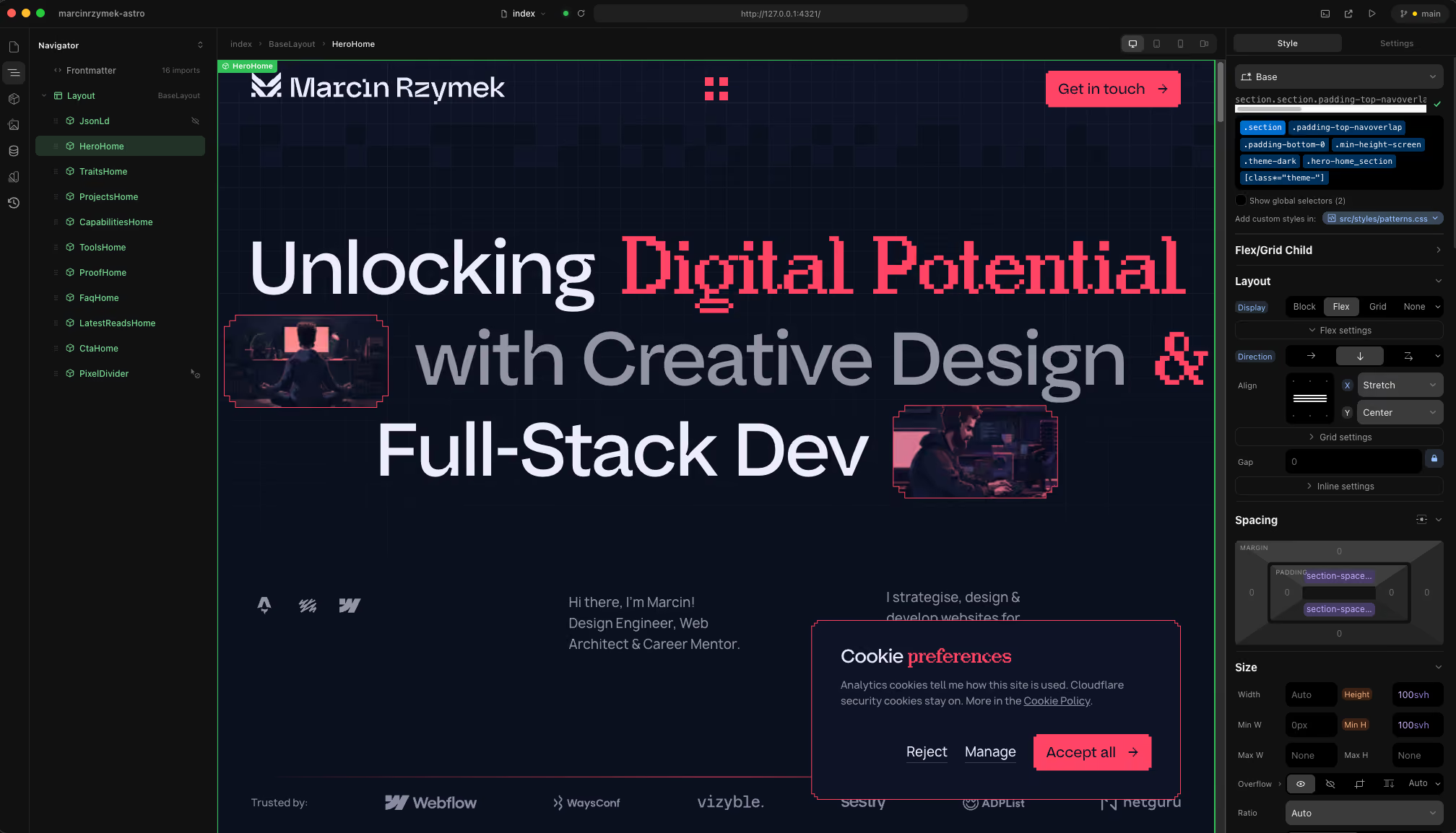
Webflow's Designer is still fantastic for designing in the browser. On my stack, design happens in Figma and building happens in code. But if you want a visual builder, remember that Timothy Ricks (yes, the Lumos guy) built Stacki. Fantastic tool. I fire it up from time to time when I want to poke at a layout visually, or test changes and see exactly what I'm changing before I ship them, without opening Figma.
Visual Preview in Sanity: Build It In
Sanity doesn't show you the live page while you edit, at least not out of the box. But the Studio is a React app, and it's all code, so you can add it yourself: Sanity's Presentation tool gives you visual editing with a live preview of your actual site, right inside the Studio. And honestly, that's the whole point of this stack. What can't you add when it's code? You shape the product around yourself.
The Studio itself can live on a free sanity.studio subdomain with a single deploy command, or you can self-host it on your own domain. I could go on about this for hours, so I will, in a separate post about why Sanity blew my mind.
The Rest of the Fine Print
- Editor hand-off takes setup. The Webflow Editor is dead simple for clients. Sanity Studio is more powerful, but someone has to set it up properly so it feels just as simple.
- You own the whole pipeline. Builds, deploys, environments. Nobody else is babysitting it.
So who should stay on Webflow? Teams where marketers edit pages visually every day, agencies with a solid Webflow pipeline and clients who love the Editor, and anyone who just doesn't want to touch a repo. That's a totally valid choice. This post is about why it stopped being the right choice for me.
Never Say Never: Webflow Isn't Off the Table
Let me be clear about one thing: I'm not crapping on Webflow.
If a client already has a site in Webflow, or wants Webflow specifically for their own reasons, I don't dig my heels in. I'll present my preferred stack and explain why I like it, but it's not a hard "no". I know how to work in Webflow. I've done it for years, and sometimes it's simply the right tool for that client.
I'm also not saying I'll never come back. The landscape changes fast, and Webflow might ship something that changes my mind.
Speaking of which: I'm keeping an eye on Source by Webflow. It was announced at Webflow Conf 2026 and is currently in a limited research preview. The big idea is that code, not the visual canvas, becomes the source of truth, AI agents get direct access to that code, and it's supposed to connect to existing stacks like Astro and Next.js. On paper, that's pretty much the direction I went myself.
Will it be as good as they say? We'll see. My gut says it's built mostly for enterprise marketing teams, not for a solo designer running a portfolio. But I'd be happy to be proven wrong.
Thank You, Webflow: You Made Me a Developer
Here's the part I really mean.
I hated code. Like, actively avoided it. And Webflow technically never required me to write any. But it forced me to understand how the web actually works: the box model, classes, structure, how a site really gets built under the hood.
And then it pulled me further. Through Webflow work I learned real dev processes: working with GitHub, pull requests, commits, full version control, staging environments, password protection, you name it. Things I would never have touched if I'd stayed a pure designer.
I wouldn't be able to run this stack without everything Webflow taught me. So leaving isn't a betrayal. It's graduation.
Webflow taught me to think like a developer. Leaving it was just the final exam.
Wrapping Up: The Next Level
So there you have it: 54 to 98 on mobile, 100s across the board on desktop, a CMS that bends to my schema instead of the other way round, zero spam, zero platform costs, and no lock-in. All of it possible because Webflow pushed a code-hater into understanding code, and AI made the last step a lot shorter.
Thinking about making the same move, or want to know how a specific piece of this stack works? Drop me a line or reach out on LinkedIn. Happy to share what I learned the hard way.
Keep pushing those pixels — just maybe not on someone else's servers.